Best App Blocker for Studying
An app blocker is one of the easiest ways to stop your phone from eating your study time. But not all blockers work the same way. Some lock apps completely, some just slow you down, and some are built for laptops more than phones. Here's how the most popular options compare, so you can pick the one that fits the way you study.
Full disclosure: StudyBlock is our app. We've included it because we built it for exactly this problem, but we've also covered the other options honestly so you can choose what works best for you.
What to look for in an app blocker for studying
Before you compare apps, decide what matters most to you. These are the features that make the biggest difference for students:
- How strict it is: some apps block completely until your session ends. Others only add a pause or a reminder, which is easy to skip when you're bored.
- Study timer and breaks: a blocker with a built-in focus timer and planned breaks is easier to use every day than one you have to set up separately.
- Platforms: make sure it works on your phone. If you also get distracted on your laptop, you may want something that covers both.
- How hard it is to cheat: look for features like strict mode or uninstall protection if you know you'll try to get around it.
- Price: most of these apps are free to download with paid upgrades. Check what the free version includes before you commit.
Quick comparison
| App | Platforms | Blocking style | Best for |
|---|---|---|---|
| StudyBlock | iOS, Android | Blocks apps until your study session ends | Students who want a study timer and app blocking in one |
| Forest | iOS, Android | Grows a virtual tree while you stay off your phone | Students who like a game-style reward |
| Opal | iOS, Android | Scheduled blocks and app limits | Cutting overall screen time |
| Freedom | iOS, Android, Mac, Windows | Blocks apps and websites across devices | Students who get distracted on their laptop too |
| ScreenZen | iOS, Android | Adds a pause before opening an app | Breaking the habit of opening apps without thinking |
| Built-in tools | iOS, Android | Time limits and schedules | A free starting point |
1. StudyBlock: best for focused study sessions
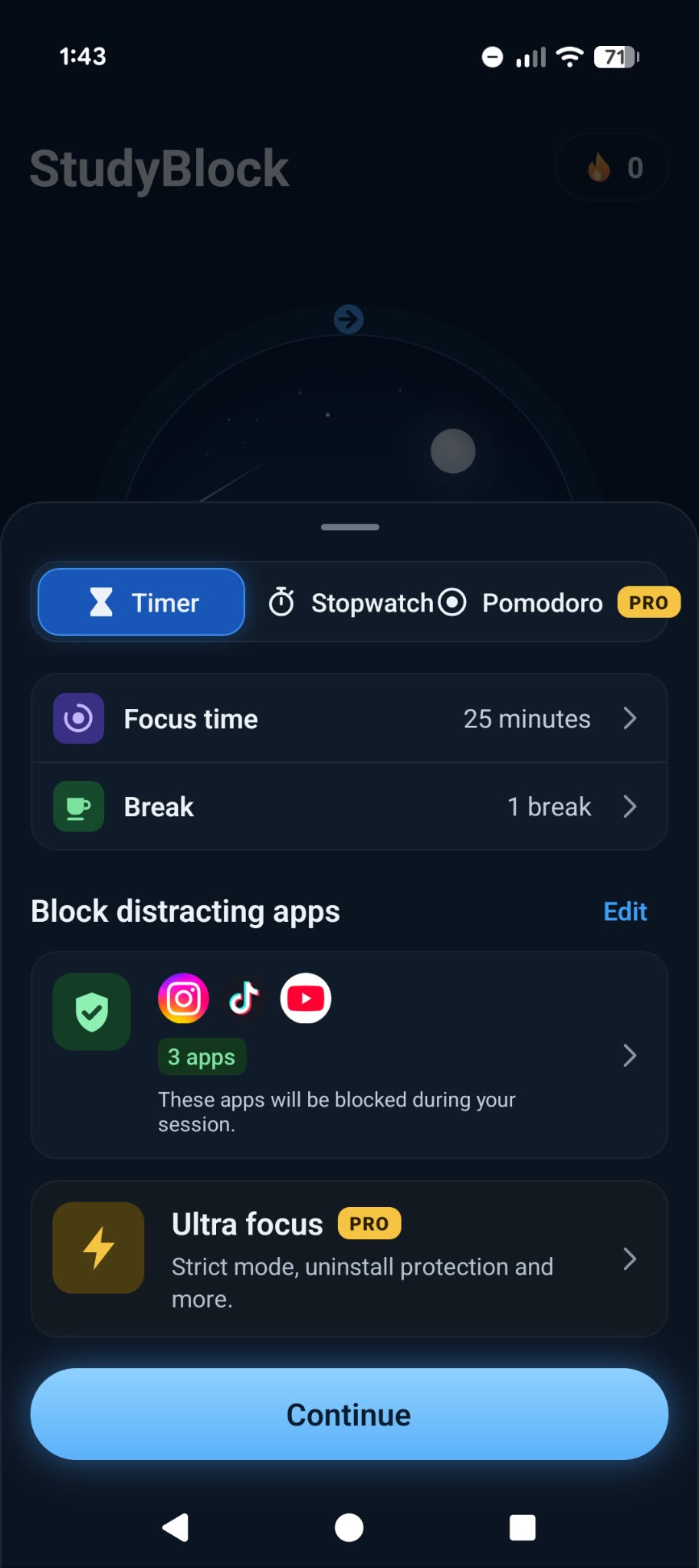
StudyBlock is built specifically for studying. You set your focus time and breaks, pick the apps you want to block, and start your session. Until the session is over, those apps won't open.
- Focus modes: study with a timer, a stopwatch, or the Pomodoro method.
- Planned breaks: you decide your breaks before you start, so you know when you can check your phone.
- Streaks: keep your study streak going to build the habit.
- Ultra focus (Pro): strict mode and uninstall protection for when you need it to be impossible to quit early.
Platforms: iOS and Android.
2. Forest: best for gamified focus
Forest turns focus into a game. When you start a session, you plant a virtual tree that grows while you stay off your phone. If you leave the app to check something else, your tree dies. Over time, you build a forest that shows how much you've focused.
It also has a Deep Focus mode that blocks other apps, and you can focus together with friends. Forest is free to download, with an optional paid upgrade for extra features.
Platforms: iOS and Android, plus a Chrome extension.
Keep in mind: Forest is built around motivation and rewards. If a virtual tree isn't enough to stop you, you may want something stricter.
3. Opal: best for reducing overall screen time
Opal is a screen time app that lets you schedule focus sessions, block apps, and see reports on how you use your phone, including a daily focus score. It's free to download, with a paid Pro plan that unlocks more features.
Platforms: iOS and Android. The iPhone version is the more established one.
Keep in mind: Opal is designed for general screen time habits, not specifically for studying, so it doesn't center on study sessions and breaks.
4. Freedom: best for blocking on your laptop and phone
Freedom blocks distracting apps and websites across your devices at the same time. Start a session on your laptop, and your phone is blocked too. That's useful if you do most of your studying on a computer and keep getting pulled into YouTube or social media in your browser.
Platforms: iOS, Android, Mac, Windows, and browser extensions.
Keep in mind: the free version is limited, and most of the useful features, like scheduling and syncing across devices, need a paid subscription.
5. ScreenZen: best free option for mindless scrolling
ScreenZen doesn't block apps completely. Instead, it makes you wait a few seconds before an app opens and asks if you really want to use it. That small pause is often enough to break the habit of opening apps without thinking. It's free and supported by optional donations.
Platforms: iOS and Android.
Keep in mind: because it only adds a delay, you can still open the app if you wait. It's better for building awareness than for locking you out during exams.
6. Built-in tools: Screen Time and Digital Wellbeing
Your phone already has app blocking built in. On iPhone, Screen Time lets you set App Limits and schedule Downtime. On Android, Digital Wellbeing has app timers and Focus mode. They're free and don't require another app.
Keep in mind: they're easy to turn off. A tap on "Ignore Limit" or a quick change in Settings and you're back on your apps. For step-by-step instructions, see our guide on how to lock apps while studying.
So, which app blocker should you choose?
- You want to study without your phone getting in the way: choose StudyBlock.
- You're motivated by rewards and progress: try Forest.
- You want to cut your screen time overall: try Opal.
- You get distracted on your laptop as much as your phone: try Freedom.
- You just want to stop opening apps on autopilot: try ScreenZen.
- You want to start for free with no new apps: use Screen Time or Digital Wellbeing.

Download StudyBlock
Block distracting apps and stay focused while you study. Available on iOS and Android.
The bottom line
The best app blocker for studying is the one you'll actually use every time you sit down to study. If you want something strict that's built around study sessions and breaks, StudyBlock is a great place to start. Whatever you choose, pick your most distracting apps, block them before you start, and give yourself planned breaks.